Still writing live video class attendance in a notebook?
Running an online remote academy means dealing with attendance management, one of the most tedious tasks. While holding live video classes, many directors still check who joined at what time and how many minutes late each student was, then copy it by hand into Excel or a notebook. The problem is that omissions and errors easily creep in during this process, and it's hard to offer clear evidence when a dispute over attendance arises with a parent. The credibility of an online remote academy ultimately comes down to small record-keeping details like these.
In this article, we look at the limits of handwritten records, an attendance management approach where live class entry and exit records accumulate automatically, and a flow in which parent notifications are sent automatically for absences and late arrivals. We also summarize the lateness criteria and attendance recognition rules that directors should decide on before introducing automation.
Limits of handwritten attendance records
These are the problems that commonly occur when attendance is managed by hand.
Teachers have to check student entry times in real time during class and write them down, which reduces their focus on teaching.
When running several classes at the same time, records get mixed up or missed.
When a parent objects, saying "My child joined on time," there is not enough objective evidence.
At the end of the month, it takes a lot of time to gather the handwritten records again and calculate attendance statistics.
These problems lower the overall efficiency of academy management and create unnecessary administrative work for teachers. As online academies grow in number, so does the demand for switching attendance management to an automated system.
How does automated attendance management work?
If a video class program is designed for teaching and learning, the times when students join and leave a class are recorded in the system automatically. The ClassCanvas live class program is a tool built for this purpose, and its focus differs from that of general video conferencing programs.
For example, video conferencing tools like Zoom are optimized for meetings and seminars, so while they keep participant entry and exit records, they don't by default offer features to process those records according to an academy's attendance criteria or link them to parent notifications. ClassCanvas, by contrast, was designed from the start with the operation of online remote academy classes in mind. In addition to the individual mode with one board per student, one-on-one feedback, and screen share, it is set up so that attendance data accumulates automatically within the flow of class.
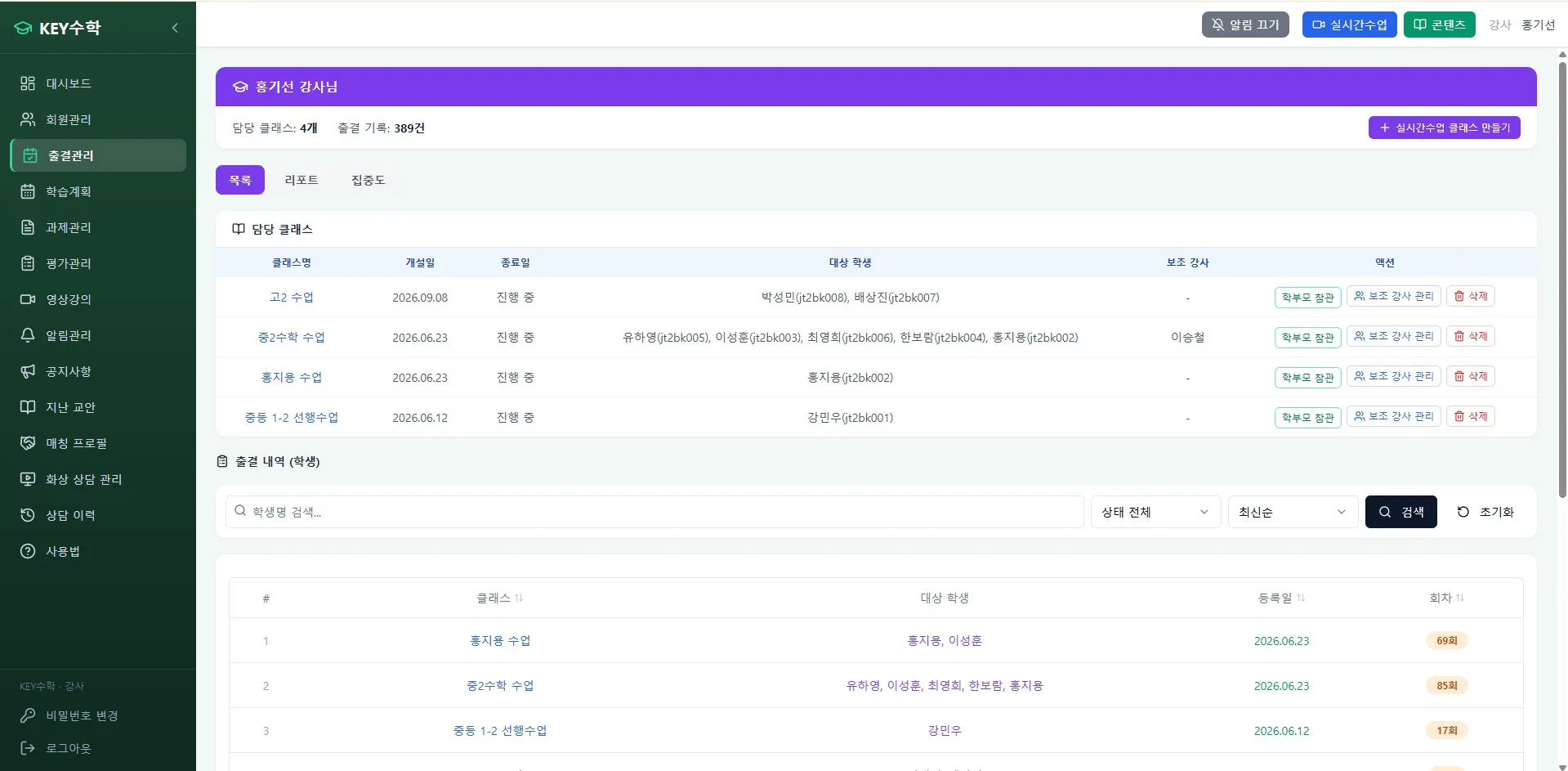
With ClassCanvas, attendance management works in the following flow.
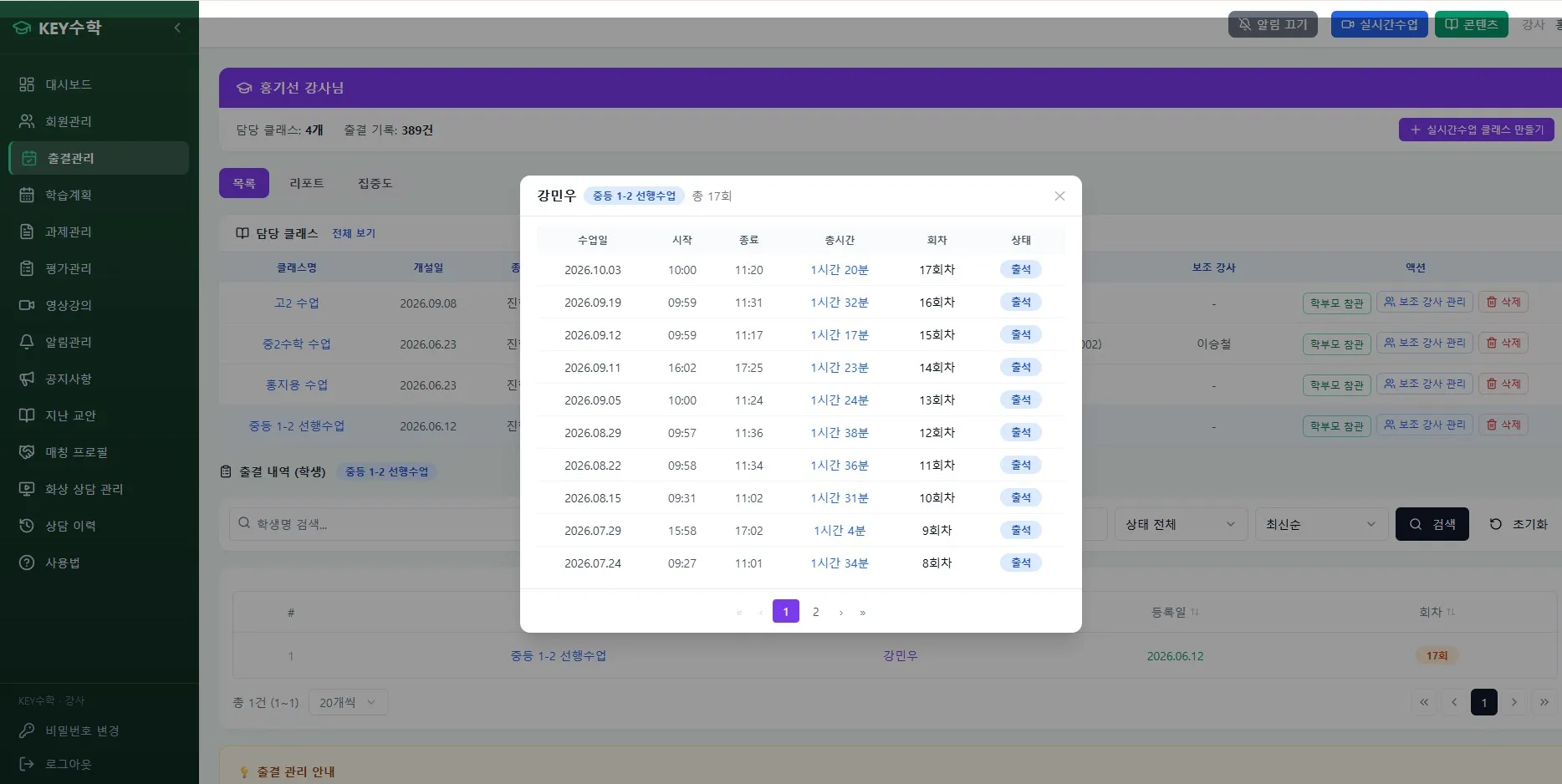
When a student joins a live class, the entry time is recorded automatically.
When the class ends or the student leaves partway through, the exit time is saved as well.
Attendance status is classified automatically according to the lateness and absence criteria you set in advance.
When an absence or late arrival is confirmed, a notification is sent to the parent automatically.
Thanks to this process, teachers need to check attendance separately during class less often, and directors are spared the effort of compiling statistics again at the end of the month.
Criteria to decide before automating
Before automating attendance management, you need to set your principles first. Since the system works according to the rules you define, vague criteria can cause confusion even after automation.
Setting lateness criteria
Up to how many minutes after the start of class counts as late (e.g., 5 minutes, 10 minutes)
Whether a certain number of accumulated late arrivals should be treated as an absence
How to handle exceptions for unavoidable reasons such as network problems
Setting attendance recognition rules
How to distinguish and record absences for which advance notice was given
How to reflect attendance when a student takes part in a make-up class
The criteria for handling a student who joined but left partway through class
If you put these criteria into a document first, you can give consistent answers to parent inquiries that come up while running an online academy, and it becomes easier to apply the rules to an automated attendance management system.
Step-by-step example
When actually introducing attendance automation at an online remote academy, you can refer to the following order.
Document the lateness and absence criteria as the academy's internal rules.
Register each class's schedule in the ClassCanvas live class program.
Set the attendance criteria (time allowed before counting as late, conditions for treating as absent) in the system.
Set who receives parent notifications and when they are sent (e.g., right after class ends).
Run a trial for about a month and check whether the criteria fit real situations.
A checklist for directors
Is the lateness cutoff time defined?
Are the criteria for handling absences (such as whether advance notice was given) organized?
Are attendance records being saved automatically?
Are parent notifications sent automatically for absences and late arrivals?
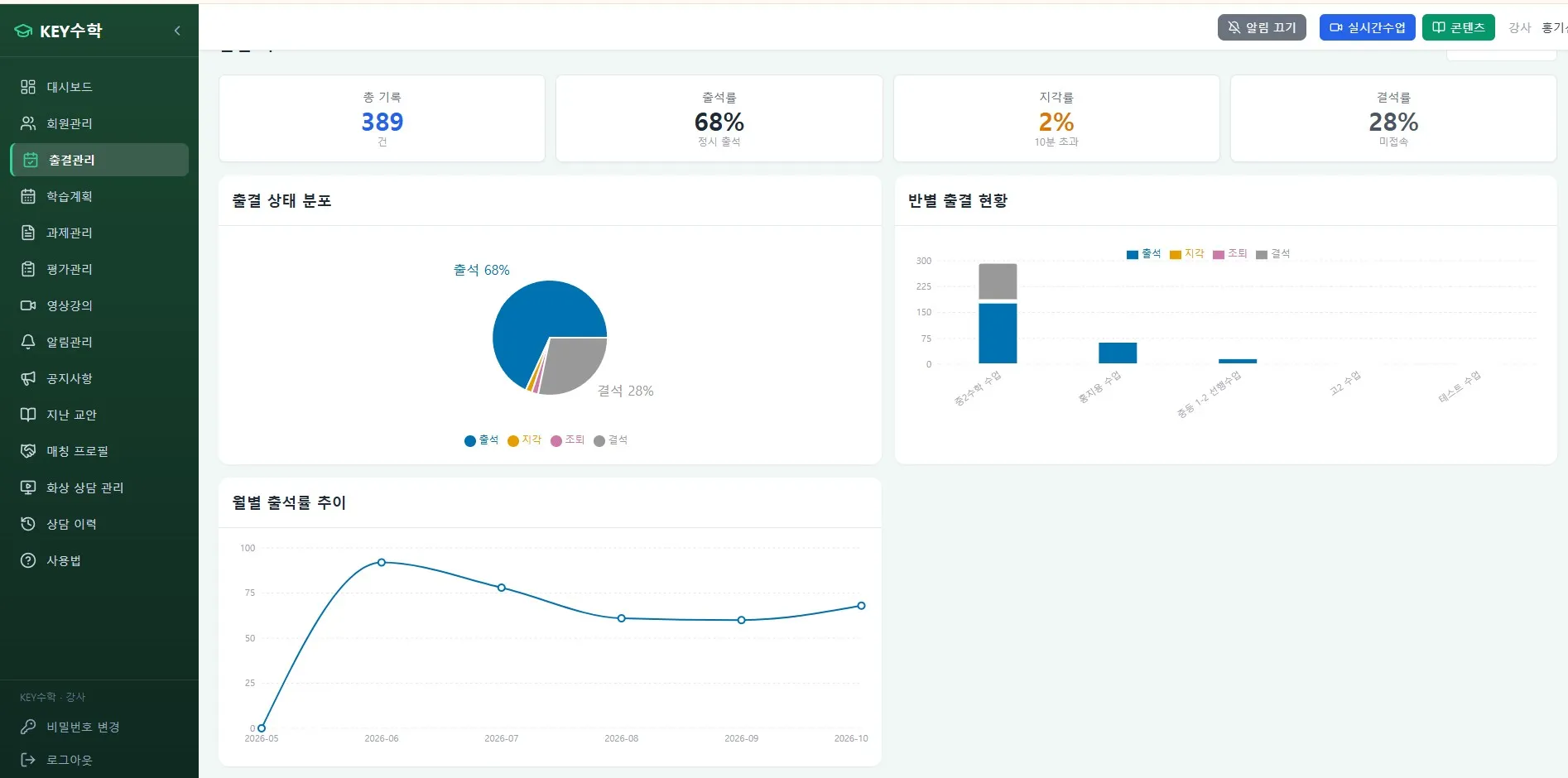
Can you check monthly attendance statistics without any extra work?
If you review your current way of operating against this checklist, you can immediately see where manual work remains.
Wrapping up
Attendance management at an online remote academy is no longer a task that should be handled by hand. If you set up a structure in which live class entry and exit records accumulate automatically and parents are notified automatically of absences and late arrivals, the administrative burden falls for both teachers and directors. However, clearly defining the lateness criteria and attendance recognition rules must come before automation.
It is also worth considering that tools designed for teaching and learning differ from general video conferencing tools when it comes to attendance management. If you run an online academy, we recommend checking whether your current way of recording attendance is lowering the overall efficiency of your academy management.
ClassCanvas learning management system
How to set up a remote academy
Inquiries: 1661-9155
ClassCanvas: the total solution for online remote academies